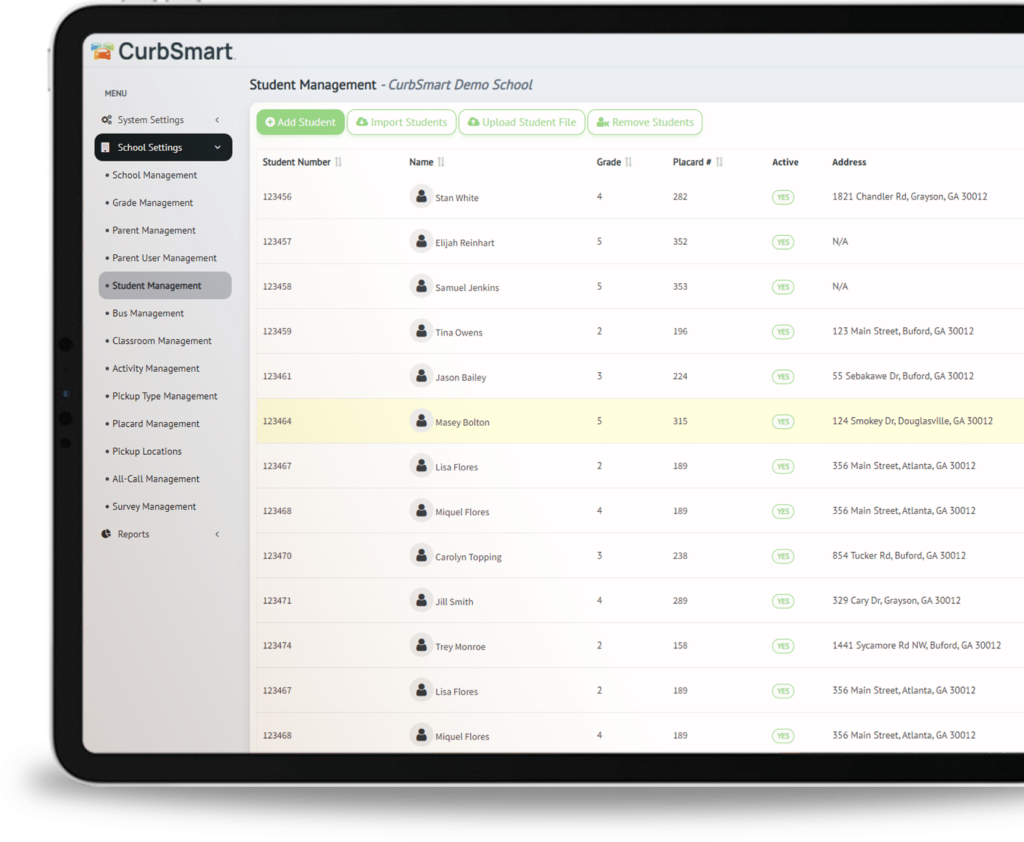
CurbSmart replaces manual carline coordination with a streamlined system your staff can learn in minutes. Customizable dismissal workflows adapt to your school’s unique setup, and real-time notifications keep parents informed as their child moves through the process. Beyond daily pickup, CurbSmart also handles after-school care tracking and activity management — giving your campus one connected tool for everything that happens after the final bell. Trusted by public, private, and charter schools nationwide.
Our customers report up to 75% reduction in the car line wait time and improved accountability.
Customer Testimonials
“CurbSmart has provided our school community with a reliable product to ensure the safety of our students during the dismissal process. CurbSmart has also shortened the time it takes us to dismiss students each afternoon, providing our staff more time to focus on tasks related to academic achievement.” – CurbSmart customer, Florida
“Carpool is going very smoothly. We cut our carpool loading time in half within a week of going live.” – CurbSmart customer, North Carolina
“CurbSmart has been a great tool and valuable asset to our car line in supporting the priority in ensuring the safety and security of our students. Everything runs smoothly because of CurbSmart!” – CurbSmart customer, Florida
“CurbSmart has absolutely revolutionized our dismissal procedures! Not only is the procedure safer for students who are now all dismissed from inside the building, the traffic flows smoothly and cuts down on student wait-time tremendously. As a result, staff members are given back time that is used for planning and other after school duties. Thank you, CurbSmart, for making our dismissal a pleasant process each day!” – CurbSmart customer, Texas
How does CurbSmart work for school dismissal?
Families are assigned one placard number per household. Parents or guardians display this number on a hangtag in their rearview mirror as they arrive to the pick-up location. Parents or guardians can check in from their device or administrators can check them in on the CurbSmart app.
Inside dismissal administrators see the numbers and names of the students appear on their device of choice and release the students.
Frequently Asked Questions
CurbSmart is an online application that streamlines student dismissal process by managing parent pickup logistics and improving safety and efficiency during school dismissal.
Yes, CurbSmart app is available in both IOS and Android systems.
CurbSmart runs on most popular browsers using any laptop or desktop, and works on Android and Apple mobile devices through both the app and browser. Schools can also project it to smartboards or TVs, just like other classroom applications.
Yes, geofencing is available as an option in CurbSmart. If enabled, parents can check in via the CurbSmart Parent mobile app to notify the school that they’ve arrived to pick up their child. Parents can only check in when their location is within a set radius, determined by the school.
Students can be imported or synched from a Student Information System or via a 3rd party such as Clever. We can also accept a .csv file or students can be manually entered.
Yes, the parent check-in option is available in CurbSmart and is set or disabled at the school’s discretion.
CurbSmart includes access to the Parent app, however, using it is not required for the system to function. If a school chooses to enable parent access, families can create a free account to add approved adults, make ride changes, and view pickup history. Schools may also allow parents to check in upon arrival, depending on their preferences.
The Way Home Report is a helpful CurbSmart feature that gives teachers—or anyone involved in dismissal—a quick list of their students, including any updates to how each student is getting home that day. It’s easy to access from the dropdown menu and keeps everyone informed and organized before dismissal begins.
Schools may use their own placards or create a custom template using CurbSmart’s Placard Design Tool. This tool allows schools to download placards as PDFs for printing in-house or through a third-party provider. While designs can vary, the most important element is the 3-digit placard number, which should be displayed in large, black font for easy visibility by Entry Admins. Schools can also share placards with parents via the CurbSmart Parent Portal, enabling parents to print their own.
Our top priority is to ensure CurbSmart remains accessible to all customers. In the rare event of an outage—such as a local internet issue—we work quickly to restore access. We recommend schools have a backup plan in place, including keeping an up-to-date placard report on hand. This report, available in the CurbSmart admin dashboard, can be used with walkie-talkies or bullhorns if needed. Schools may also share placards with parents through the Parent Portal, allowing them to print their own.
We’re here to help! You can reach us by phone or email anytime Monday through Friday, between 7:30 AM and 6:00 PM Eastern Time. Whether you have a quick question or need a bit more guidance, our team is ready to assist.
CurbSmart is easy to learn and fully customizable to meet each school’s needs. We offer video tutorials, user manuals, PowerPoint templates, and personalized training sessions. Our team trains the designated project owners at your school, who then lead the training for teachers and staff.
Yes. In the School Admin Portal, administrators can send messages to both parents and teachers directly within the system. This feature allows schools to quickly communicate important updates, including emergency notifications, ensuring timely and effective outreach.
Benefits
- Manage all types of school dismissal (car, bus, walkers, afterschool dismissal)
- Designed by public & private institutions to fit any dismissal process
- Ease of Use for your Parents & Teachers
- Parent App use is optional
- Improve Student Dismissal Efficiency
- Increase Safety and Security concerns
- Eliminate Communication Breakdowns
- Reduce area Traffic and Congestion
- Works on multiple technology platforms (smartphones, PC’s, tablets)
- Highly rated customer support to help you through it!
Features
- Free parent school dismissal app
- Parents can manage carpools and way home changes
- Guardians ability to check-in with Geofencing
- Aftercare management such as check-in / check-out
- Create arrival questionnaires such as health screenings
- Release from groups anywhere in the facility
- Filter screen to only show students you are responsible for
- Automatically reroute students to a different pickup type
- Create ‘silent’ announcements or ‘all-calls’
- Auto assign pickup location and station
- Verify approved adults for every child
- Create multiple release times
- Verify approved adults submitted by parents
- Add photos of students and parents
- Set classroom schedules for older children
- Reunification messaging for emergencies
- Assign students pickup spots such as cones or colors
- Site license for all users and parents
- Customize every user for ease of users
- Administration panel to manage all settings

School/Institution Administrators
- User Management
- Add and manage unlimited user accounts
- Designate roles for teachers and staff
- Determine which screens are displayed to each staff member
- Customize more than 15 user settings, including the ability to start the release process, update filters, and enable notifications
- Set filters per user to determine which students appear in their view
- Student Administration
- Import student data from your Student Information System
- Add students quickly as they enroll through the year
- Auto-assign placard numbers to students, or manually assign numbers upon creation
- Add photos to both students and/or parents for additional security
- Add an unlimited number of classrooms and use them to group students and run reports
- Set classroom schedules per student
- Determine each student’s default way home, and apply scheduled changes as necessary
- Mark students as absent or checked out early
- Mark students as inactive or delete those who are no longer enrolled
- Parent/Guardian Management
- Add unlimited adults as approved pickups
- Manage parent accounts and email login credentials directly from CurbSmart
- Add red flags to students or parents to notify of security threats or custody issues
- Create carpools that occur once, or on a scheduled basis
- Group families onto the same number to reduce number of car tags and speed up dismissal
- Add notes, address, or contact information to student records to be used as verification during dismissal
- General Settings
- Set release times per grade level
- Customize exit locations for better communication of student release locations
- Delay entry of students in Inside views – Batch student dismissals, customize # of cars in a batch
- One-step or Two-step release option
- Set cutoff time for Pickup Type Changes
- Create an unlimited number of after-school activities (After School) and determine the schedules
- Access reports on student dismissal history, changes, carpools and more
- Add unlimited number of buses and manage bus rosters
- Add an unlimited number of way home options
- Create health screenings to be completed by the parent or arrival staff during morning check-in
- Download classroom and bus rosters
- Run reports on student absences or early check-outs
- Create monthly after-school check in, check-out, and sign out reports, and include signature lines for parents (After School)
Teachers and Release Coordinators
- Automatically reroute students when the Way Home is changed on the fly
- Lookup students by name when placard is not presented at pickup
- Verify approved adults and other confirmation details when entering students at carline arrival
- Mark students as absent with an easy “swipe-left”
- Create “silent” announcements, or “all-calls,” to quickly communicate details with the entire dismissal staff
- Receive notifications when process begins, all-calls are made, or students are ready to be released from the Inside or Outside Admin screens
- View pre-populated rosters with students who are walking home, in afterschool activities, riding buses, or other forms of transportation other than car rider
- Check students in as they arrive to after-school activities (After School)
- Receive notifications when parents arrive to pick up students from after-school activity (AfterSchool)
- Receive parent digital signature when signing student out from after-school activity (After School)
- Search for students to view details of student whereabouts and release history
- Check students in as they arrive for morning drop-off and determine which parent dropped them off (Morning Check-Ins)
- Adjust the font size to display on larger monitors such as Promethean boards or digital white boards
- Display multiple columns of students ready for release
- Auto-assign pickup location, station, and colors as each car is entered to easily communicate to students as they are exiting
- Filter the Inside and Outside Admin screens to view only students assigned to certain grouping, like classroom, grade, pickup location, pickup type or more
Parent & Guardians
- Update account information and confirmation details like address, phone number and vehicle information
- View each student’s daily way home
- Add carpools on a specific day, or create a scheduled carpool
- Add parents or guardians or other adults as approved pickups, all linked to the same placard number, and determine days when these adults are approved
- Control Way Home changes, including car rider, bus, afterschool activities, walkers, and carpool scheduling
- Check in via the CurbSmart app to notify staff of your arrival (at school’s request)
- Upload photos of students and adults for additional security
- View student’s pickup history
- Add students to activities